Simple Online Homeschool Planning with Homeschool Planet
As a homeschooling parent, it can sometimes be overwhelming to manage lesson plans, schedules, and record-keeping while still having time to teach my kids too. That’s why I was excited to discover the Homeschool Planet Online Planner! This planner is full of features that make online homeschool planning quick and easy, so I can spend less time making plans and more time with my kids. In this post, I’ll share my personal experience with Homeschool Planet, as well as the features and benefits of this fantastic planning tool.

I received compensation and access to the Homeschool Planet Online Planner from Homeschool Planet in exchange for my honest review, but all the opinions in this post are my own. This post contains affiliate links and I may earn a small commission when you purchase through the links.
What is Homeschool Planet Online Planner?
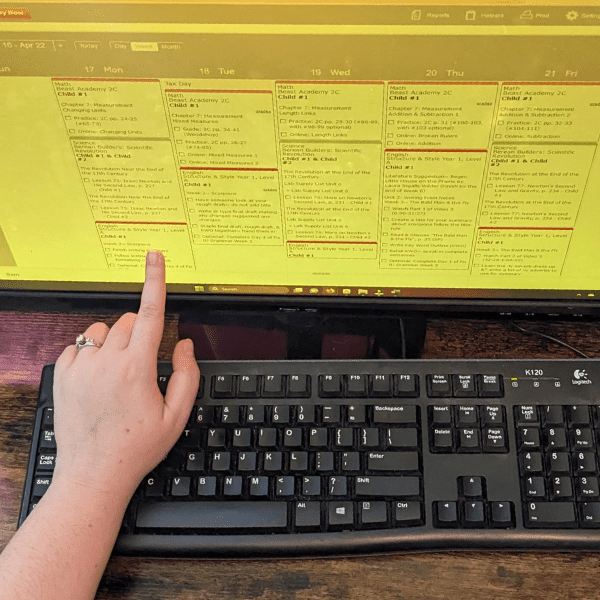
Homeschool Planet Online Planner is an online planning system that makes all of the planning and record keeping that’s needed for homeschooling easy. Homeschool Planet has many features to help with homeschool planning, such as quick and easy lesson planning, family scheduling, attendance tracking, and record-keeping. With Homeschool Planet, it is easy for homeschooling parents to create, modify, and track lesson plans and assignments.
One of the best things about Homeschool Planet Online Planner is that it is very flexible and easy to customize. This means homeschooling families can create lesson plans that work best for them based on their schedules, learning styles, and curriculum choices. Homeschool Planet has an extensive library of pre-made lesson plans for popular homeschool curriculum options that parents can use as well.
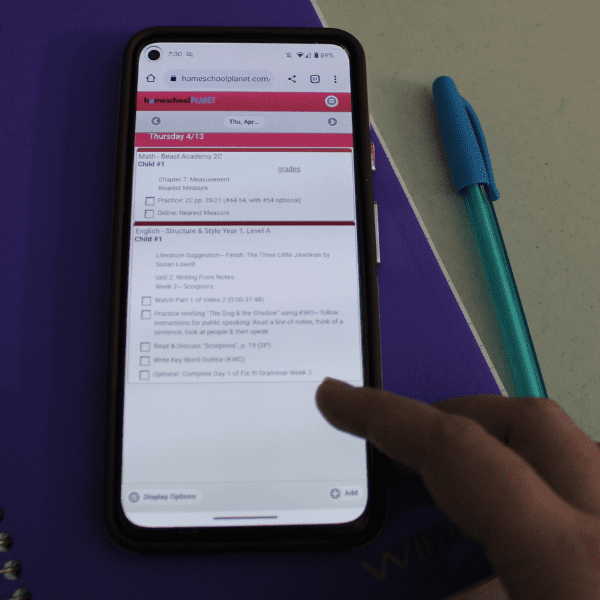
Homeschool Planet Online Planner is easy to use and even has a mobile version that’s perfect for viewing on a phone or tablet. Homeschool Planet Online Planner is a great option for families who want to simplify homeschool planning and record-keeping while still having lots of customization options.
Watch a video overview of Homeschool Planet here.
Online Homeschool Planning With Homeschool Planet Online Planner
Getting started with Homeschool Planet Online Planner is easy and straightforward! Here’s what you need to do to get started using the app:
Create an Account: The first step is to create an account with Homeschool Planet. You can sign up for a 30 day free trial or purchase a subscription right away. Once you’ve created an account, you can log in and start exploring the program.
Add Your Children: Next, add your children to the program by entering their names and grade levels. This will allow you to create lesson plans and assignments specifically for each child. You can also create a separate login for each family member, so you can control what your kids can see and edit inside the app.
Customize Your Settings: Homeschool Planet is highly customizable, so you’ll want to take some time to explore the settings and options available to you. You can create a custom school year calendar that matches your family’s vacation schedule and school holidays.
Find or Create Your Lesson Plans: Once you’ve set up your account and customized your settings, it’s time to create your lesson plans. Homeschool Planet makes it easy to create and adjust lesson plans, assignments, and homeschool schedules. And, if you’re using a curriculum option from the Lesson Plan Marketplace, you can add in plans for the whole year with just a few clicks.
Start Using Homeschool Planet Online Planner: With your account set up and your lesson plans in place, you’re ready to start using Homeschool Planet! Log in regularly to update your lesson plans and track your progress. Homeschool Planet also makes it easy to generate reports and transcripts, so you can stay on top of your homeschooling goals.
Get a free trial of Homeschool Planet here.
Features of Homeschool Planet Online Planner
I am so glad that I discovered Homeschool Planet Online Planner. Here are a few of my favorite features that make homeschool planning easy.
Simplifies Homeschool Planning
As a homeschool mom, I’m always looking for ways to make my life easier and save valuable time. That’s why I love using Homeschool Planet Online Planner. Here are some of the ways Homeschool Planet makes planning our homeschool year simple:
• Easy to Use: Homeschool Planet Online Planner is incredibly user-friendly and easy to navigate. I had no problems getting started with Homeschool Planet and figuring out how to use the planner. The easy-to-learn interface makes it simple to modify and move homeschool lessons and assignments. In just a few minutes, I had all the lessons from my paper planner imported into Homeschool Planet for the entire homeschool year!
• Customizable: Homeschool Planet Online Planner allows you to create lesson plans and schedules in different ways to fit your own schedule and homeschool calendar.
It is also really easy to adjust and modify your plans as needed throughout the entire year. Since we often adjust our homeschool schedule to match my husband’s work schedule, I really appreciate the flexibility to change the calendar in our planner at any time.
As a homeschool parent, I have never planned for the entire year before, because I don’t want to get behind and have to re-create the whole plan. The great thing about Homeschool Planet is that it’s easy to change the plan for the rest of the year with just a few clicks!
Learn more about how Homeschool Planet simplifies homeschool planning here.
Lesson Plan Marketplace
One of the best features of Homeschool Planet Online Planner is the Lesson Plan Marketplace, which which allows you to import pre-made lesson plans for the entire year into your planner with just a few clicks. As a homeschool mom, I love this feature because it saves me so much time creating and writing out the lesson plans for the whole year.
Recently, I used the Lesson Plan Marketplace to import my son’s math and science lessons for the entire year. It was incredibly easy to do – I simply searched for the curriculum we were using and found lesson plans available for download. With just a few clicks, I was able to import the lessons directly into our Homeschool Planet digital planner. This saved me hours of planning time and made it easier for me to keep track of my son’s progress throughout the year.
The Lesson Plan Marketplace includes lessons from many major homeschool curriculum publishers, including:
- All About Reading & Spelling
- Apologia
- Master Books
- Notgrass History
- Math Mammoth
- The Art Of Problem Solving
- Teaching Textbooks
- And many more!
This saves so much time because it’s much faster and easier to edit the plans that are already created than to write my own. It also provides a great starting point for parents who are new to homeschooling or just looking for a different way to approach their lesson planning.
Check out all the curriculum options available on Homeschool Planet’s Lesson Plan Marketplace here.
Saves Time
“I just love spending time planning for our homeschool journey and keeping records,”- said no homeschool mom, ever.
That’s why I love that this simple homeschool planner makes these tasks so fast and easy.
An easy to use interface, lots of opportunities to customize the lesson plans, and the pre-made lesson plans make homeschool planning take a fraction of the time!
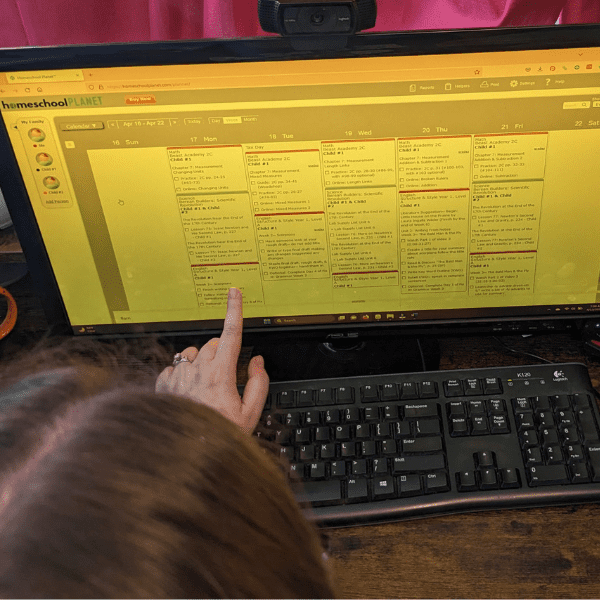
Customizable and Flexible Plans
One of my favorite features is how easy it is to create customized lesson plans that fit my family’s unique needs. As a homeschooling parent, I need a planner that is flexible and adaptable, and Homeschool Planet delivers just that.
The platform’s flexible scheduling options allow me to easily adjust my schedule and assignments, which is perfect for accommodating unexpected events or last-minute changes.
Last week, we got invited to go on a last minute field trip with some friends. With the automatic rescheduling features in Homeschool Planet, I just skipped the day’s homeschool lessons and rescheduled my entire plan for the homeschool year with just a few clicks. This means that we didn’t get behind, even though we took a day off unexpectedly.
Check out all the features of Homeschool Planet here!
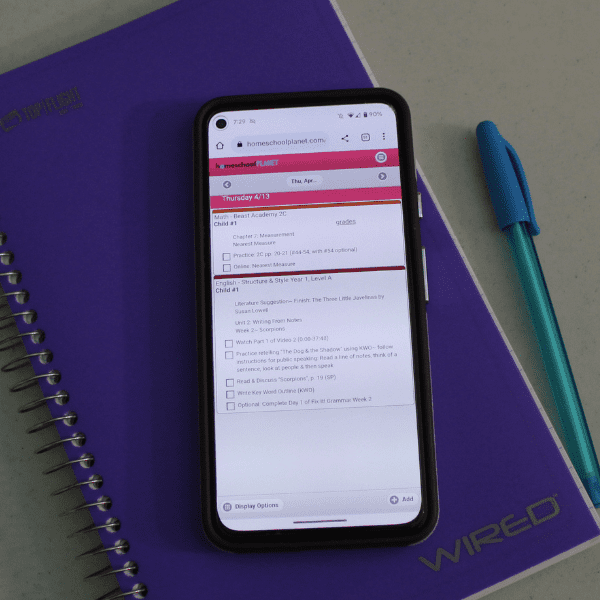
Keeps Parents Organized
As a homeschooling mom, staying organized is crucial for keeping our homeschool running smoothly. That’s why I love using Homeschool Planet Online Planner – the best digital planning tool for homeschooling families.
I love that Homeschool Planet offers daily and weekly digest emails. I set up my account so that I would receive an email from Homeschool Planet each day with each of my family’s daily schedules inside. This is an easy way to stay up to date on what needs to be done each day. I could also email my kids’ individual schedules to them, or even send text message reminders about lessons that are due right from the app!
The integrated calendar function is another lifesaver for homeschool moms. It allows me to see all of our homeschooling activities in one place, including field trips, appointments, and extracurricular activities. This is especially helpful for planning our homeschool year and making sure we don’t double-book anything. I can even manage our to-do list and shopping list right from the app!
Gone are the days of paper planning and trying to juggle multiple calendars. With Homeschool Planet Online Planner, everything I need is in one easy-to-use digital planning tool. It’s the perfect solution for busy homeschool moms who want to stay organized and on top of their homeschooling goals.
Teaches Responsibility to Kids
As a homeschooling parent, I know that one of the most important things I want to teach my children is responsibility. That’s why I love that Homeschool Planet offers features that help my kids take charge of their own homeschooling.
Here are some of my favorite features:
- Send Emails to Remind Kids About Their Assignments: With Homeschool Planet, I can easily set up email or text message reminders for my kids’ assignments. This helps them stay on track and teaches them the importance of keeping up with their responsibilities.
- Create a Login for Your Child to Manage Their Work Independently: Homeschool Planet allows me to create a login for each of my children. This way, they can access their own assignments and manage their work independently. It’s a great way for them to take ownership of their education and develop important organizational skills.

Try Homeschool Planet Online Planner for Homeschool Planning Today!
I am feeling so much more organized, now that I’m using Homeschool Planet Online Planner for my family’s homeschool lesson plans. Homeschool Planet Online Planner is an excellent tool for homeschooling families looking to streamline their homeschool planning, record-keeping, and organization. With its customizable features and flexible scheduling options, it provides a comprehensive solution to help homeschooling parents manage their homeschool days more effectively.

Homeschool Planet is offering a 30 day free trial. You’ll get access to the full version of the planner so you can try out all the features with no credit card information required.
You will also get to pick the lesson plan of your choice from the Homeschool Planet Lesson Plan Marketplace!
Try Homeschool Planet Online Planner today!